Automotive digital inspection software that earns the customer's yes.
Most declined repairs aren't a “no.” They're “I don't believe you.” Two-thirds of U.S. drivers don't fully trust repair shops (AAA), usually fearing unnecessary work (76%) or overcharging (73%). A verbal recommendation asks them to take your word for it. ShopOS's digital vehicle inspection software shows them instead: the cracked belt, the worn pad, the leak, on their own phone, with a photo behind every finding and one-tap approval.
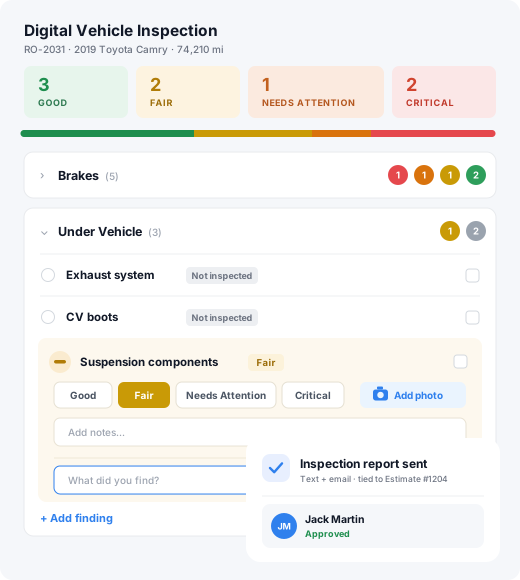
What is automotive digital inspection software?
Automotive digital inspection software, also called digital vehicle inspection (DVI) software, replaces the paper multi-point inspection with a phone. The technician photographs and rates each finding, the customer gets the results with a photo behind every recommendation, and approves the work in one tap. In ShopOS, digital inspections are included on both plans, and approved work goes straight onto the repair order.
Key facts
- 64% of service customers want photo or video with their inspection. Only 26% at mass-market brands and 44% at premium brands get it. (J.D. Power 2026 U.S. CSI)
- 49% of customers say photos or video make them more likely to approve recommended work. (Cox Automotive 2026 Fixed Operations & Ownership Study)
- Shops with a strong digital inspection practice see a 27–28% higher average repair order. (Detect Auto State of Inspection Intelligence 2026)
- Two-thirds of U.S. drivers don't fully trust repair shops, most often fearing unnecessary work (76%) or overcharging (73%). (AAA)
Show them what you found.
Techs already walk the vehicle. A digital vehicle inspection just puts what they find on the customer's phone, so the yes comes back before anyone picks up. It's also what customers expect: 64% want photo or video with their inspection, but only 26% at mass-market and 44% at premium brands get it (J.D. Power, 2026 U.S. CSI Study).
- Captured on the phone the tech already carries, during the walk-around they already do
- Photos and notes attach to the estimate, so the customer sees exactly what they're paying for
- Approval comes back on their phone: no phone tag
The revenue is in the inspection.
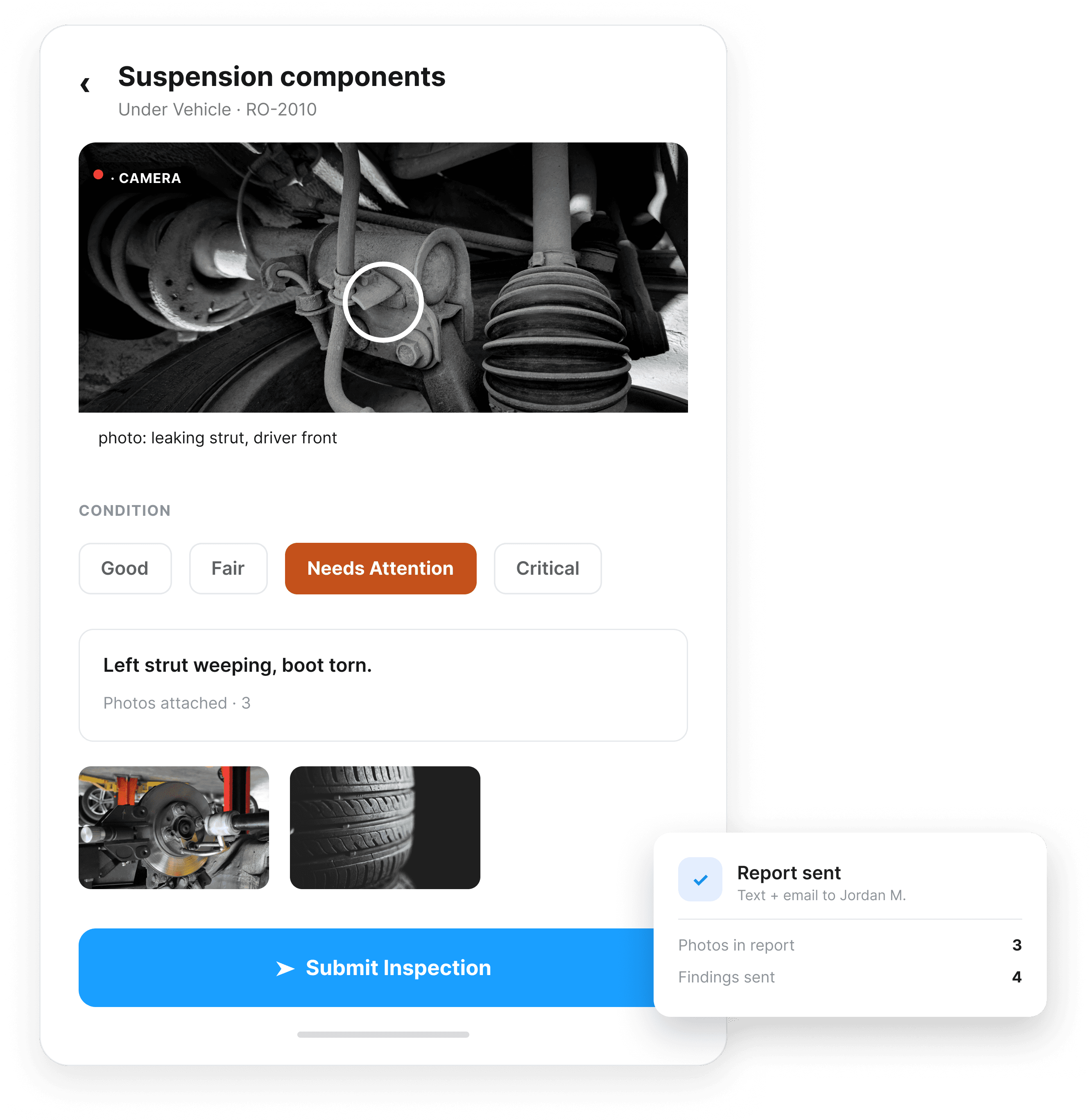
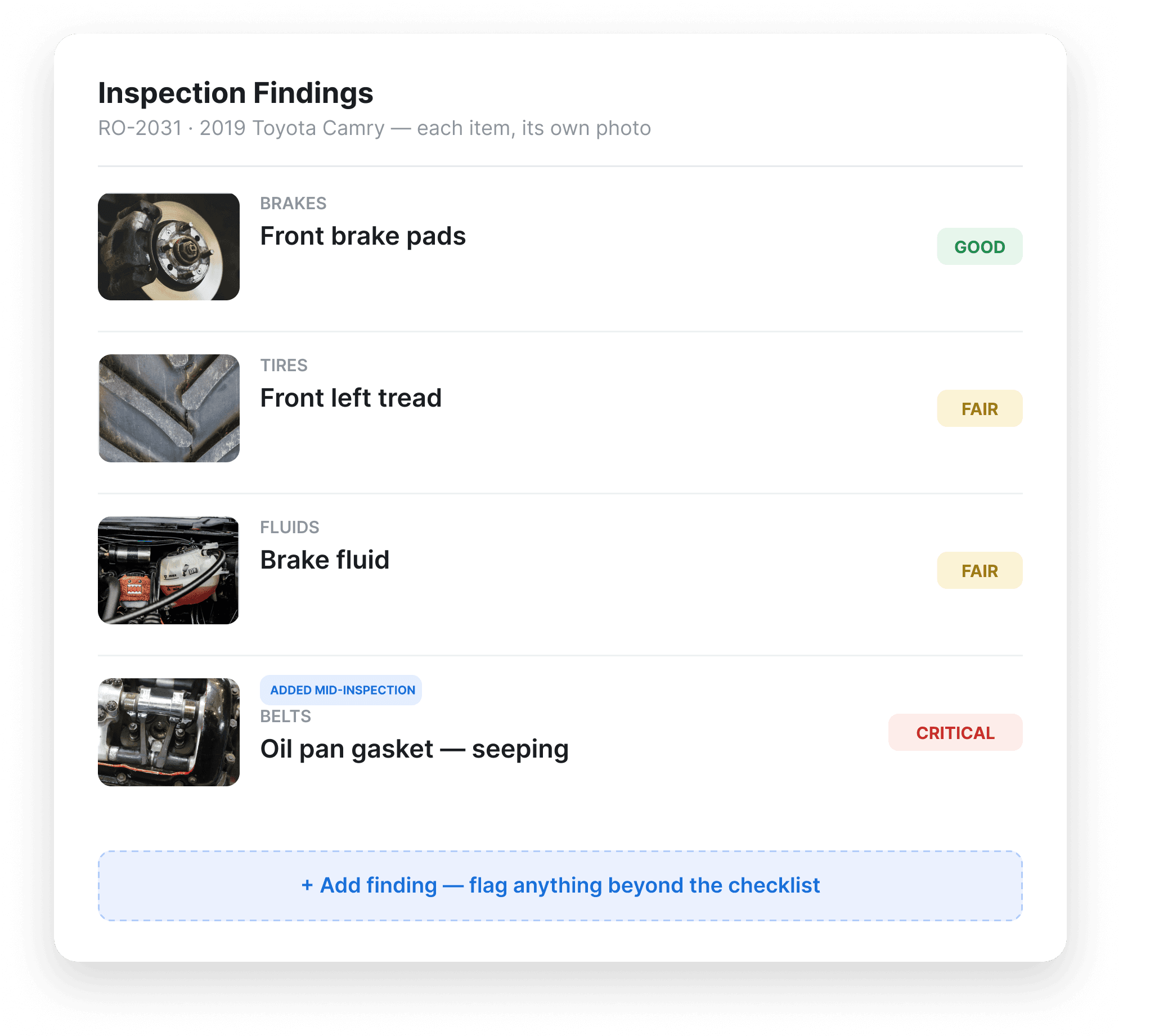
A DVI isn't one big note field. Each item (brakes, tires, fluids, belts, lights) gets its own entry, photographed separately: a clean record, not a paragraph the tech has to remember at the end.
- A photo on every item, not one gallery for the whole inspection
- Each tagged Good / Fair / Critical, so urgency is obvious at a glance
- Techs can add issues beyond the standard checklist mid-inspection
The approval flow: from “showing customers what’s wrong” to a signed yes.
This is the part that moves revenue. 49% of customers say seeing photos or video makes them more likely to approve the work (Cox Automotive, 2026). A customer who gets an email with a photo of their own worn brake pad doesn't need a phone call to be talked into the work. They see it, they believe it, they approve it.
One-tap approval straight from the email: no app download, no login
Declined and deferred work stays visible for next time, not lost on a paper form
Every inspection saves to the vehicle's history, so the next service advisor isn't starting from zero
Approval syncs straight to the repair order: no one re-types what the customer said yes to
Built for what's actually in the bay.
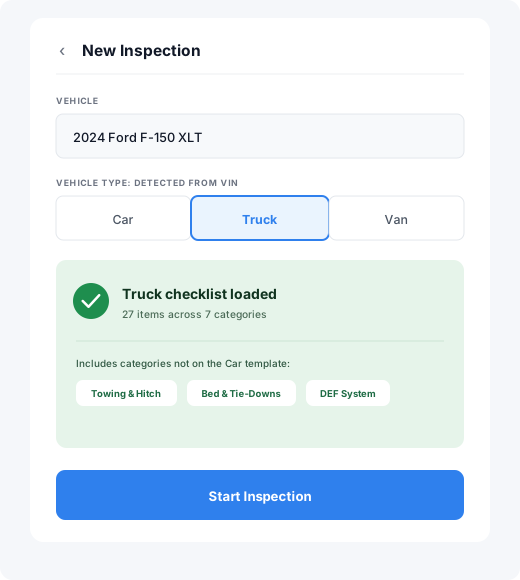
A sedan, a work truck and a cargo van don't get inspected the same way. Different fluid checkpoints, different tire counts, different underbody points. ShopOS builds the digital vehicle inspection around the vehicle in front of the tech instead of handing them a generic passenger-car checklist and expecting them to ignore half of it.
- Separate templates for cars, light trucks and vans
- Each one checks what matters on that vehicle, and nothing that doesn't
- The tech picks the template at check-in, so nothing real gets skipped
What does ShopOS automotive digital inspection software include?
Six things separate an inspection that gets approved from a checklist on a screen. Each one is included on both ShopOS plans.
A photo on every finding
Not one gallery for the whole car. Each item gets its own photo and note.
A rating the customer can read
Good, Fair or Critical on every item, so urgency is obvious without a phone call.
Approval without an app
The customer approves from the email. No download, no account, no login.
Approved work on the repair order
What the customer says yes to syncs to the repair order. Nobody re-types it.
Declined work that comes back
Deferred items stay on the vehicle's history for the next visit, not on a lost paper form.
Templates for the vehicle in the bay
Separate templates for cars, light trucks and vans, so techs check what matters on that vehicle.
Comparing vendors? Our guide to digital vehicle inspection software lists the questions to ask any of them.
How does a digital vehicle inspection work in ShopOS?
- 1.The technician picks the template for the vehicle at check-in.
- 2.During the walk-around, each item is photographed, noted and rated Good, Fair or Critical. Issues outside the checklist are added as they're found.
- 3.The finished inspection goes to the customer by email, with the photos attached to the estimate.
- 4.The customer approves the recommended work in one tap.
- 5.Approved work lands on the repair order. Declined work is saved to the vehicle's history as deferred work.
What a digital inspection is actually worth vs. a paper checklist.
A paper inspection form does one job: it proves you looked. A digital one does three more. It builds trust, it speeds up approval, and it survives after the customer drives away.
Paper checklist
- Every finding gets re-keyed from the clipboard after the car's already gone.
- The sheet ends up stapled to an invoice, buried in the glovebox, never looked at again.
- Nothing's on record: if a customer questions what was found, it's your word against theirs.
- The car ties up a bay while a tech waits on a callback that may never come.
ShopOS digital inspection
- Findings are captured once, on the phone: nothing to re-key.
- Everything lives in the customer's record, one tap away: nothing to lose in a glovebox.
- A documented history that protects the shop if a customer disputes what was found.
- One-tap approval keeps the car moving instead of waiting on a callback.
Why more shops are moving off paper.
The shift to digital inspections isn't happening for its own sake: it's happening because shops that switch see it directly in their numbers. Recommendations get approved faster, and more often, once the customer can see what the tech saw.
Transparency
Approving off a photo beats approving off a typed note. Visual proof lifts trust, approvals, and average repair order: 27–28% higher with strong digital inspection (Detect Auto, 2026).
Speed
One tap to approve, straight from the email: the work starts the moment the customer says yes, not after a round of phone calls.
Tracking
Every inspection saved to a centralized dashboard: a full audit trail, with urgent safety defects flagged automatically.
Frequently asked questions
What is a digital vehicle inspection?
Do customers need to download an app?
Is automotive digital inspection the same as a digital vehicle inspection?
Can we start with a paper checklist and switch later?
How do we add digital inspections to our shop's workflow?
Does this replace our paper inspection sheets entirely?
Does a digital vehicle inspection actually increase approvals?
See ShopOS in action.
Want a starting point before you switch? Download the free vehicle inspection checklist →
Book a demo